Git Bayesect: Bayesian Bisection for Non-Deterministic Bugs
Traditional git bisect fails when bugs appear randomly. Git bayesect solves this with Bayesian inference, making non-deterministic bug hunting actually possible.

Why Does Git Bayesect Change Non-Deterministic Bug Hunting?
Learn more about emdash: wordpress successor solving plugin security issues
Developers know the frustration of flaky bugs that appear randomly. Traditional git bisect assumes bugs are deterministic, failing completely when a test passes sometimes and fails other times. Git bayesect introduces Bayesian inference to version control debugging, finally making it possible to track down those elusive non-deterministic bugs.
The tool represents a significant leap forward in debugging methodology. Instead of giving up when a commit shows inconsistent behavior, bayesect builds a probabilistic model of which commits are likely culprits based on multiple test runs.
What Are the Limitations of Traditional Git Bisect?
Git bisect has been the go-to tool for finding regression-causing commits since 2005. It uses binary search to efficiently narrow down the problematic commit in O(log n) time. You mark commits as "good" or "bad," and bisect splits the commit range in half repeatedly until it identifies the culprit.
This approach breaks down completely with non-deterministic bugs. When a test might pass or fail on the same commit, bisect cannot make definitive decisions. Race conditions, timing issues, network flakiness, and hardware-dependent bugs all create this scenario.
Developers typically resort to manual investigation or simply accepting the flaky behavior. Both options waste time and reduce code quality.
What Makes Bugs Non-Deterministic?
Several common scenarios produce non-deterministic behavior:
Race conditions: Multiple threads accessing shared resources without proper synchronization create unpredictable failures.
Timing dependencies: Tests that rely on specific execution speeds or timeouts fail inconsistently.
External dependencies: Network calls, database connections, or third-party APIs introduce variability.
Hardware variations: Different CPU architectures, memory configurations, or disk speeds affect behavior.
Environmental factors: System load, available memory, or background processes impact test outcomes.
For a deep dive on cern levels up with new superconducting karts, see our full guide
How Does Git Bayesect Use Bayesian Inference?
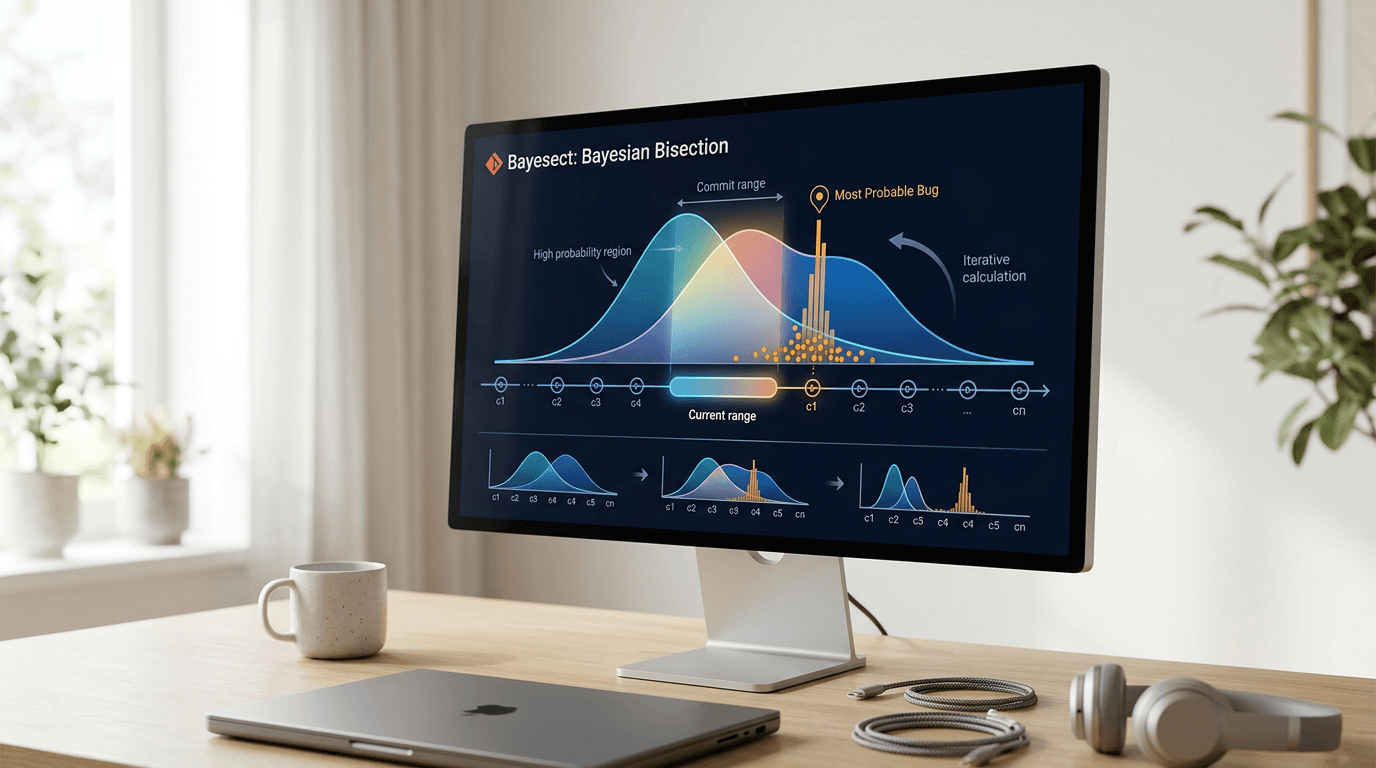
Bayesect takes a fundamentally different approach by embracing uncertainty. Instead of requiring definitive "good" or "bad" labels, it runs tests multiple times per commit and calculates probabilities.
For a deep dive on track artemis 2 with your unistellar smart telescope, see our full guide
The tool maintains a probability distribution over all commits in the range. Each test result updates these probabilities using Bayes' theorem. Commits that consistently fail tests become more likely culprits, while those that pass frequently become less suspicious.
This probabilistic framework allows bayesect to make intelligent decisions even with inconsistent test results. It automatically determines which commit to test next based on information gain, maximizing debugging efficiency.
What Mathematics Powers Git Bayesect?
Bayesect uses Beta distributions to model the probability that each commit contains the bug. The Beta distribution naturally handles binary outcomes (pass/fail) and updates elegantly with new evidence.
When you run a test, bayesect updates its belief about every commit in the range. A failure increases the probability for recent commits, while a pass increases it for older ones. The algorithm converges toward the true culprit as you gather more data.
The tool automatically balances exploration and exploitation. It tests commits where additional information would most reduce uncertainty, similar to how A/B testing frameworks optimize experiments.
How Do You Install and Use Git Bayesect?
Getting started with bayesect requires minimal setup. The tool integrates seamlessly with existing git workflows and doesn't require changes to your test infrastructure.
Installation typically involves adding the tool to your development environment through your package manager. The command-line interface mirrors git bisect's familiar syntax, reducing the learning curve for experienced developers.
What Are the Basic Workflow Steps?
Using bayesect follows a straightforward process:
Initialize the bisection: Specify the known good and bad commit range to establish your search boundaries.
Define your test command: Provide the script or command that reproduces the bug consistently enough to gather data.
Set confidence parameters: Choose how many test runs per commit and desired confidence level based on your time constraints.
Let bayesect run: The tool automatically tests commits and updates probabilities without manual intervention.
Review results: Examine the final probability distribution and most likely culprit to guide your debugging efforts.
The tool handles the complexity of running multiple tests and interpreting results. You simply wait for it to converge on the answer with your specified confidence level.
What Are the Real-World Applications and Benefits?
Bayesect shines in scenarios where traditional debugging fails. Development teams working on concurrent systems, distributed applications, or performance-critical code benefit most from this approach.
The tool saves countless hours previously spent on manual investigation. Instead of running the same test dozens of times and trying to spot patterns, developers get quantitative probability estimates. Quality assurance teams can finally track down those "works on my machine" bugs that appear sporadically in CI/CD pipelines.
When Should You Use Bayesect?
Consider bayesect when you encounter these situations:
Tests that fail intermittently in your continuous integration system waste valuable build time and developer attention.
Performance regressions that only appear under specific load conditions elude traditional debugging approaches.
Bugs that reproduce only on certain hardware or operating systems require probabilistic analysis to isolate.
Race conditions that manifest unpredictably need multiple test runs to identify patterns.
Memory leaks or resource exhaustion issues that take time to surface benefit from systematic probability tracking.
What Are the Performance Considerations and Trade-offs?
Bayesect requires more test executions than traditional bisect. Where bisect might need 10-15 test runs for a thousand commits, bayesect might need 50-100 runs depending on the bug's flakiness and your confidence requirements.
This trade-off makes sense for non-deterministic bugs. Running 100 automated tests beats spending hours or days on manual investigation. The tool parallelizes test execution when possible, reducing wall-clock time.
You can adjust the confidence threshold to balance speed and accuracy. Higher confidence requires more tests but reduces false positives. Lower confidence finishes faster but might occasionally miss the true culprit.
How Can You Optimize Your Test Commands?
Fast test execution dramatically improves bayesect's practicality. Consider these optimization strategies:
Isolate the minimal reproduction case instead of running full test suites to reduce execution time per test.
Use containerization to ensure consistent test environments and eliminate environmental variables.
Parallelize independent test runs across multiple machines to decrease wall-clock debugging time.
Cache dependencies and build artifacts between test runs to avoid redundant compilation steps.
What Does the Future Hold for Probabilistic Debugging?
Git bayesect represents a broader trend toward probabilistic thinking in software development. As systems grow more complex and concurrent, deterministic debugging tools increasingly fall short.
The same Bayesian principles could extend to other debugging scenarios. Imagine tools that probabilistically identify which microservice causes distributed system failures, or which configuration change introduced performance degradation. Machine learning integration could further enhance these tools by providing better priors based on historical bug patterns.
How Does Git Bayesect Make Flaky Bugs Tractable?
Git bayesect transforms an impossible debugging scenario into a tractable one. By embracing uncertainty rather than fighting it, the tool finally gives developers a systematic approach to non-deterministic bugs.
The Bayesian framework provides quantitative confidence measures instead of guesswork. Teams can make data-driven decisions about which commits to investigate further or potentially revert.
Continue learning: Next, explore she built an ai solution at 3 a.m.: a ceo's blueprint
While bayesect requires more test executions than traditional bisect, it solves problems that previously had no good solution. For any team dealing with flaky tests or intermittent bugs, this tool deserves a place in the debugging toolkit. The probabilistic approach represents the future of debugging in an increasingly complex software landscape.
Related Articles

Transforming Gaza: From Conflict Zone to Tech Hub
A leaked plan from the Trump administration reveals a bold strategy to turn Gaza into a thriving high-tech hub. Discover the potential.
Sep 3, 2025

Gaza's Tech Revolution: Trump's Bold High-Tech Vision
A leaked plan from the Trump administration unveils a vision to make Gaza a high-tech hub, focusing on AI, cybersecurity, and digital innovation.
Sep 3, 2025

AI's Role in Unveiling ICE Officers' Identities
AI unmasking ICE officers underscores a shift towards transparent law enforcement, raising questions about privacy and ethics in the digital age.
Sep 2, 2025
Comments
Loading comments...